
Tutorial · Beginner · 30 min
Why delay() Breaks Robots: Timing With millis()
A blocked loop cannot see anything. What delay() costs a robot in millimetres, the millis() pattern that replaces it, and the rollover bug in the obvious fix.
Introduction
Almost every robot on this site runs a loop that has to do several things at once: read a sensor, update a controller, drive the motors, maybe answer a radio. delay() is the first timing tool anyone learns, and it is the one that makes all of that impossible.
The problem is not that delay() is slow. It is that during a delay() the robot is not doing anything at all — not reading its sensors, not steering, not noticing that it is about to hit a wall. It is a program that has voluntarily stopped.
This page is about what that actually costs, the pattern that replaces it, and the one bug that the obvious replacement still has.
What delay() actually does
delay(50) spins in a tight loop watching a timer until 50 ms have passed. Your code does not advance. The only things that still happen are interrupts — the timer that drives millis(), the serial receive interrupt, anything you attached with attachInterrupt().
That exception matters and it is also a trap: an encoder counted in an interrupt keeps counting during a delay(), so the number stays right while the robot’s behaviour stops. Which makes the fault harder to see, not easier.
What it costs, in millimetres
A control loop can only react at the rate it samples. Something that appears just after a read is not noticed until the next one.
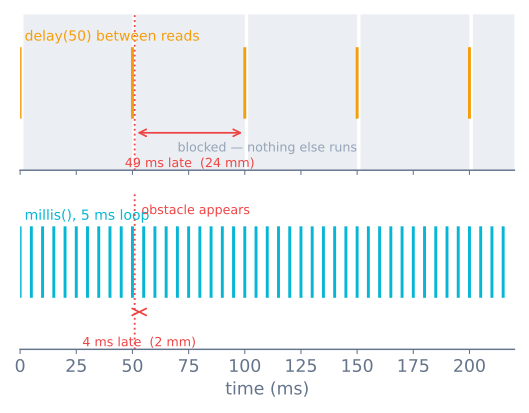
Twenty-four millimetres is most of a line-follower’s sensor array. It is also more than enough to leave a maze cell, overshoot a junction, or tip a balancing robot past recovery — that one needs a 200 Hz inner loop, which is a 5 ms budget for everything, and a single delay(50) spends ten loops’ worth of it. Latency is always a distance — how far the robot travels before it can act is what decides whether it stops in time or drives off the edge.
The pattern that replaces it
Instead of stopping until it is time, ask each pass whether it is time yet:
unsigned long lastRead = 0;
const unsigned long READ_INTERVAL = 50;

void loop() {
  unsigned long now = millis();

  if (now - lastRead >= READ_INTERVAL) {
    lastRead = now;
    readSensor();
  }

  // everything else keeps running, every pass
  updateMotors();
  checkBumper();
}
loop() now runs thousands of times a second and the sensor read happens on schedule inside it. Nothing is blocked, and adding a second timed job is four more lines rather than a rewrite.
The rollover bug
millis() returns an unsigned long — 32 bits on an AVR — counting milliseconds since boot. It runs out at 2³² ms and wraps back to zero, which is 49.7 days.
Two ways to write the same comparison, and only one survives that:
if (now - lastRead >= READ_INTERVAL)   // correct
if (now >= lastRead + READ_INTERVAL)   // wrong
Take lastRead = 4294967290 with a 100 ms interval, moments before the wrap. lastRead + 100 overflows to 94, and now >= 94 is immediately true — so the timer stops waiting and fires every pass until the counter catches up. The subtraction form has no such problem, because unsigned subtraction wraps in exactly the way that makes the difference come out right.
Three rules follow:
- Always subtract, never add.
now - last >= interval. - Keep every timestamp
unsigned long. Storingmillis()in anintor a signedlongreintroduces the bug immediately, andinton an AVR wraps after 32 seconds. - Never test equality.
now == targetis a coin flip; a busy pass steps straight over it and the event never fires.
micros() deserves its own warning. It wraps at 2³² microseconds, which is 71.6 minutes — a completely ordinary runtime for a robot. Same rules, much sooner.
Several things, at different rates
Once there are more than two or three timed jobs, give them a table instead of a pile of variables:
struct Task {
  unsigned long last;
  unsigned long interval;
  void (*run)();
};

Task tasks[] = {
  { 0,   5, readSensors   },
  { 0,  10, updateControl },
  { 0, 200, reportStatus  },
};

void loop() {
  unsigned long now = millis();
  for (Task &t : tasks) {
    if (now - t.last >= t.interval) {
      t.last = now;
      t.run();
    }
  }
}
That is a cooperative scheduler, and it is all most robots ever need. Two notes on it:
t.last = now restarts the clock from when the task actually ran, so a late pass makes the next one late too and the cadence slowly drifts. t.last += t.interval holds the cadence instead — better for a control loop, worse if a task ever overruns its interval, because then it tries to catch up and runs back to back. Use += for the loop whose timing matters and = now for everything else.
And the whole thing depends on no task blocking. One delay() inside reportStatus() and every other task is late.
When blocking is still the right answer
Not every wait is a mistake. The test is whether it is shorter than a loop pass.
delayMicroseconds(10)to make an HC-SR04’s trigger pulse is fine. Ten microseconds is nothing, and there is no non-blocking way to produce it.pulseIn()is not fine. It blocks until the echo returns or the timeout expires. An HC-SR04 at its 4 m limit is an 8 m round trip, which at 343 m/s is 23 ms — and a missed echo costs you the full timeout you set. This is why that tutorial insists on setting one.Serial.print()hides a delay. It returns immediately while the 64-byte buffer has room, and blocks once it does not. At 9600 baud the buffer takes 67 ms to drain, so printing a 40-character line every pass at 100 Hz will absolutely stall the loop. Use 115200, print less, and print on a slow timer.
Your loop time is a real number
Stop guessing at it:
unsigned long worst = 0;

void loop() {
  unsigned long t0 = micros();

  // ... the whole loop body ...

  unsigned long dt = micros() - t0;
  if (dt > worst) worst = dt;   // report this on a slow timer, not here
}
Track the worst pass, not the average. The average tells you the loop is comfortable; the worst tells you what the control loop actually has to survive, and it is usually a Serial.print, a pulseIn timeout, or an I²C read that had to wait.
This matters most for a PID controller. The derivative term divides an error change by the time between samples, so jitter in that interval turns straight into noise on D — and gains tuned at one loop rate stop being right at another. Either run the loop at a fixed interval and treat dt as constant, or measure dt each pass and use the real value. Doing neither is why a controller that behaved on the bench misbehaves once the radio code is added.
What to use instead
| Instead of | Use |
|---|---|
delay() to pace a sensor read |
millis() interval check |
delay() to blink an LED |
A timer in the same loop |
delay() to wait for a servo to arrive |
Estimate the travel time and check millis() |
delay() to debounce a button |
Timestamp the edge, ignore changes for 20 ms |
delay() between motor speed steps |
A motion profile driven off elapsed time |
delay() to slow the whole loop down |
Nothing — run fast and time the jobs individually |
pulseIn() with no timeout |
pulseIn(pin, HIGH, 30000) and a “no echo” branch |
When it goes wrong
| Symptom | Usually |
|---|---|
| Robot ignores its bumper while turning | A delay() inside the turn |
| Sensor readings arrive in bursts | Everything sharing one timer instead of separate intervals |
| Fine on the bench, sluggish with logging on | Serial.print blocking once the buffer fills |
| Timer fires continuously after ~50 days | The now >= last + interval form |
| Timer misbehaves after about an hour | micros() rollover at 71.6 minutes |
| Timer never fires at all | Timestamp stored in int, or an equality test |
| PID tuned well, then behaves differently | Loop rate changed; dt is not what the gains assumed |
| Encoder counts right but robot reacts late | Interrupts still run during delay() — the counts are not the problem |
The habit worth building is to treat loop() as something that must always return quickly. Once that is true, adding a feature is adding a task, and the robot keeps its reflexes. Once it is not, every new feature makes the robot slightly blinder, and the cause is never where the symptom is.
Explore the graph
Part of these builds
Projects and learning paths that include this tutorial.
- ProjectBuild a Mecanum Robot That Drives Sideways
- ProjectBuild a Mini Sumo Robot: Grip, Wedge and Edge Sense
- ProjectBuild a Pen Plotter: Two Stepper Axes That Arrive
- ProjectBuild a Pick-and-Place Robot That Knows It Missed
- ProjectBuild a Room Coverage Robot That Sweeps a Floor
- Learning pathRobot Electronics Foundations: A Learning Roadmap
Further reading