
Tutorial · Beginner · 20 min
Read an HC-SR04 Ultrasonic Sensor: Reliable Distance in Code
How to read an HC-SR04 on Arduino: pulseIn with a timeout, converting echo time to centimetres, and a median filter that kills the random spikes.
A robot that avoids obstacles is only as good as the distance it steers on. That number comes from an HC-SR04 ultrasonic sensor: it chirps, listens for the echo, and the round-trip time tells you how far away the nearest thing is. This guide turns that raw ping into a distance in centimetres you can trust—one that survives the sensor’s dropouts and stray echoes instead of sending your robot into a wall.
How the sensor reports distance
The HC-SR04 speaks a simple two-pin language. You pulse Trigger HIGH for 10 microseconds; it fires eight 40 kHz bursts and raises Echo until the reflection returns. The time Echo stays HIGH is the round-trip time, and sound travels about 343 m/s, so:
distance_cm = echo_time_us * 0.0343 / 2The division by two is because the sound went out and came back. The component page covers the wiring and the physics; here we care about reading it cleanly in code.
Read it with pulseIn—and always set a timeout
The timeout matters for a second reason beyond correctness: pulseIn blocks, so a missed echo stalls your whole loop for however long you allow. See non-blocking timing for what that costs a moving robot.
pulseIn measures how long a pin stays HIGH. The trap: if the echo never returns—nothing in range, or a soft surface that scatters the sound—pulseIn blocks for its full default timeout and your control loop stalls. Always pass an explicit timeout sized to your maximum range:
const int TRIG = 9, ECHO = 10;
const unsigned long TIMEOUT_US = 25000UL;  // ~4 m of round trip

long pingCm() {
  digitalWrite(TRIG, LOW);  delayMicroseconds(2);
  digitalWrite(TRIG, HIGH); delayMicroseconds(10);
  digitalWrite(TRIG, LOW);

  unsigned long us = pulseIn(ECHO, HIGH, TIMEOUT_US);
  if (us == 0) return -1;             // timed out: nothing in range
  return (long)(us * 0.0343 / 2.0);
}
Returning -1 for a timeout—rather than 0—matters. A 0 reads like “an obstacle is touching the sensor,” which is the opposite of “the way is clear.” Keep “no echo” distinct from “very close.”
Why the raw reading jumps
Point an HC-SR04 at a wall and the readings still flicker, because the real world is messy:
- Soft or angled targets scatter the echo away from the receiver, so you get an occasional huge value or a dropout.
- The ~15° beam means the sensor reports the nearest thing in a cone, so a table leg to the side can spike a short reading.
- Polling too fast (under ~60 ms apart) lets the previous ping’s echo leak into the next reading.
Feed those raw jumps straight into a stop-or-turn decision and the robot twitches. You need to smooth the stream without adding lag.
A median-of-5 filter
The right tool is a median, not an average. An average smears a single wild spike across several readings; a median simply throws it out. Take five pings and use the middle one:
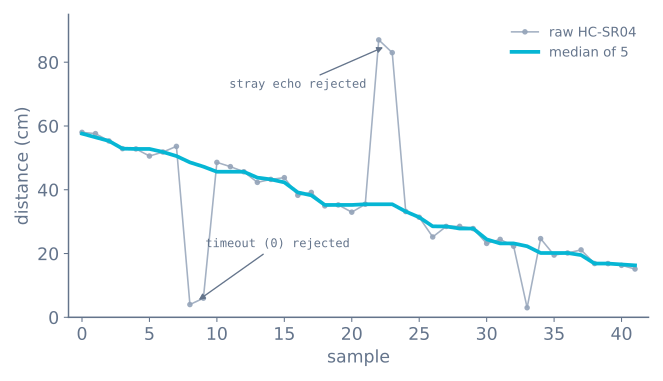
int cmpLong(const void* a, const void* b) {
  return (*(long*)a) - (*(long*)b);
}

long medianCm() {
  long s[5];
  for (int i = 0; i < 5; i++) {
    long v = pingCm();
    s[i] = (v < 0) ? 400 : v;   // treat timeout as "far", not "touching"
    delay(30);                  // let the previous echo die away
  }
  qsort(s, 5, sizeof(long), cmpLong);
  return s[2];                  // the middle value
}
Two details make this robust: mapping a timeout to a large “far” value (so a lost echo never reads as an obstacle), and the small delay between pings so echoes don’t cross-talk. For the theory behind filtering without over-smoothing, see sensor noise, bias, and filtering.
Stop blocking the loop
Everything above still stalls the loop. pulseIn waits, delay(30) waits, and five pings at
30 ms apart is 150 ms in which the robot reads no other sensor and makes no decision. At
0.3 m/s that is 4.5 cm of blind travel per measurement.
The fix is to drive the sensor as a small state machine that the main loop steps through without ever waiting:
enum PingState { IDLE, TRIGGERED, WAITING };

PingState state = IDLE;
unsigned long stateSince = 0;
long lastDistance = -1;

const unsigned long PING_PERIOD_MS = 60;   // let the previous echo die away
const unsigned long ECHO_TIMEOUT_MS = 30;  // beyond the sensor's range

void updatePing() {
  const unsigned long now = millis();

  switch (state) {
    case IDLE:
      if (now - stateSince < PING_PERIOD_MS) return;
      digitalWrite(TRIG, HIGH);
      stateSince = micros();          // note: microseconds for this short step
      state = TRIGGERED;
      break;

    case TRIGGERED:
      if (micros() - stateSince < 10) return;
      digitalWrite(TRIG, LOW);
      stateSince = now;
      state = WAITING;
      break;

    case WAITING:
      if (echoComplete) {             // set by the interrupt below
        lastDistance = echoMicros / 58.2;
        echoComplete = false;
        stateSince = now;
        state = IDLE;
      } else if (now - stateSince > ECHO_TIMEOUT_MS) {
        lastDistance = -1;            // no echo — far, or invisible
        stateSince = now;
        state = IDLE;
      }
      break;
  }
}
The loop now calls updatePing() and moves on. lastDistance is always the most recent
completed measurement, at most 60 ms old, and nothing else in the robot has waited for it.
Timing the echo with an interrupt
The state machine still needs to know when the echo arrived, and polling digitalRead in the
main loop costs resolution. An interrupt on both edges of the Echo pin costs nothing:
volatile unsigned long echoStart = 0;
volatile unsigned long echoMicros = 0;
volatile bool echoComplete = false;

void echoISR() {
  if (digitalRead(ECHO) == HIGH) {
    echoStart = micros();
  } else if (echoStart != 0) {
    echoMicros = micros() - echoStart;
    echoStart = 0;
    echoComplete = true;
  }
}

void setup() {
  pinMode(TRIG, OUTPUT);
  pinMode(ECHO, INPUT);
  attachInterrupt(digitalPinToInterrupt(ECHO), echoISR, CHANGE);
}
On an Arduino Uno this must be pin 2 or 3 — the only two external-interrupt pins — and if your robot has wheel encoders, they want both of them. That conflict is real, and it is one of the more common reasons a project moves to a Nano’s pin-change interrupts, a Mega, or an ESP32.
Note the echoStart != 0 guard. Without it, a falling edge arriving without a preceding rising
edge — which happens on the first interrupt after a timeout — computes a nonsense duration from
a stale timestamp.
Choosing a filter
Median is the right default, but it is worth knowing what the alternatives actually do, because they fail differently:
| Filter | Rejects a single spike? | Lag | Cost | Use when |
|---|---|---|---|---|
| None | No | 0 | — | Never, on a moving robot |
| Mean of 5 | No — it smears the spike across 5 samples | 2 samples | Low | The noise is Gaussian, not spiky |
| Median of 5 | Completely | 2 samples | Sorting, trivial at n=5 | Ultrasonic. This is the right answer |
| Median of 3 | Yes, one spike | 1 sample | Lowest | You need the extra responsiveness |
| Exponential (EMA) | No | Depends on α | Lowest | Smoothing an already-clean signal |
| Median then EMA | Yes, plus smoothing | 2 samples + α | Low | Fast loops that need both |
Ultrasonic noise is not Gaussian — it is occasional wild outliers against an otherwise steady signal, which is precisely the case a mean handles badly and a median handles perfectly. One 400 cm spike in a set of five 30 cm readings moves the mean by 74 cm and the median by nothing at all.
Temperature, if you need the accuracy
The 58.2 divisor assumes 343 m/s, which is the speed of sound at 20 °C. It is not constant:
speed (m/s) = 331.3 + 0.606 x temperature_celsius| Temperature | Error against a 20 °C assumption | At 2 m |
|---|---|---|
| 0 °C | Reads 3.5% too far | 7 cm |
| 10 °C | 1.8% too far | 3.5 cm |
| 30 °C | 1.7% too near | 3.4 cm |
| 40 °C | 3.5% too near | 7 cm |
For obstacle avoidance, ignore this entirely — 7 cm at 2 m changes no decision. For a robot measuring a gap, or one working in a garage in winter, compensate:
float cmPerMicrosecond(float tempC) {
  return (331.3f + 0.606f * tempC) / 20000.0f;   // /1e6 for us, /2 for round trip
}
If the robot already carries an MPU-6050 — or almost any I²C sensor — you have a temperature reading available for free.
Running several sensors
Two HC-SR04s that ping simultaneously will each hear the other’s chirp, producing wild readings on both. They must take turns:
const int SENSORS = 3;
int current = 0;
long distance[SENSORS];

void updateAll() {
  if (pingComplete(current)) {
    distance[current] = lastDistance;
    current = (current + 1) % SENSORS;    // round-robin
    startPing(current);
  }
}
The cost is refresh rate: three sensors at 60 ms each means any individual sensor updates every 180 ms. If that is too slow — and on a moving robot it often is — the answer is either fewer ultrasonic sensors, or mixing in a VL53L0X, which uses light and therefore cannot interfere with a sonar at all.
Troubleshooting
| Symptom | Likely cause | Fix |
|---|---|---|
| Robot freezes at random | pulseIn with no timeout |
Pass a timeout, or use the non-blocking state machine |
| Emergency stops in an empty room | Treating a timeout as 0 cm | A timeout means far. Return a sentinel and handle it |
| Readings alternate wildly | Polling faster than ~60 ms | Let the previous echo die away |
| Steady but a few percent wrong | Temperature | Compensate with the formula above |
| Wild readings with two sensors | They hear each other | Round-robin, never simultaneous |
| Fine on the bench, noisy on the robot | Motor noise on the 5 V rail | Decouple the sensor supply; keep its wires from motor leads |
| Occasional huge value survives the filter | Mean instead of median | Use the median — a mean smears a spike, it does not reject it |
| ESP32 pin stopped responding | 5 V Echo into a 3.3 V GPIO | Divider on Echo; check the pin still works |
Where this goes next
You now have one clean number: the distance straight ahead. Two things build on it. Mount the sensor on a servo and sweep it to see which way is open—servo-scan an ultrasonic sensor—and feed the result into the decision loop in the obstacle-avoidance algorithm. You can try the whole sense-and-steer behaviour first in the obstacle avoidance simulator.
Explore the graph
Part of these builds
Projects and learning paths that include this tutorial.
Further reading