
Tutorial · Beginner · 19 min read
ROS 2 Nodes, Topics, Services, and Actions
Learn how ROS 2 nodes communicate, when to use topics, services, or actions, and how to inspect a robot graph with practical command-line checks.
The Robot Operating System 2 (ROS 2) lets independently running programs exchange typed data. A camera driver, motor controller, planner, and user interface can be separate nodes connected through the ROS graph. The important design decision is not merely the message type; it is whether the interaction is a stream, a short request, or a long-running goal.
This guide stays distribution-neutral. Commands and core concepts are stable, but installation details and package versions should follow the documentation for the ROS 2 release you actually use.
Model one responsibility per node
A node is a participant in the ROS graph. Good node boundaries follow responsibilities: a lidar driver publishes scans, an odometry node estimates motion, and a navigator accepts goals. Avoid making every function a node—process and communication overhead are justified when the boundary improves reuse, isolation, deployment, or ownership.
Names make the graph understandable. Use descriptive node and interface names such as /front_lidar, /wheel_odometry, and /cmd_vel. Namespaces let two robots run equivalent graphs without collisions.
Inspect a running system before changing it:
ros2 node list
ros2 node info /wheel_odometry
ros2 topic list -t
ros2 service list -t
ros2 action list -t
node info reveals publishers, subscribers, service servers/clients, and actions connected to that node. It is often the fastest way to find a missing or incorrectly named interface.
Use topics for continuous streams
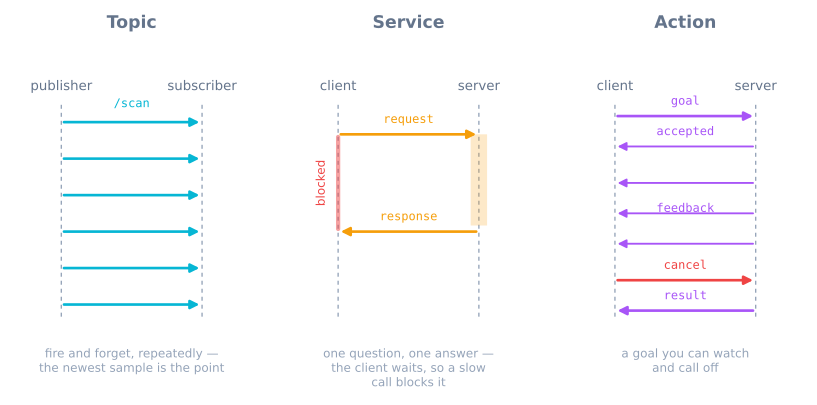
A topic is asynchronous publish/subscribe communication. Publishers send typed messages without waiting for a direct response, and any number of subscribers can receive them. Topics fit data that changes over time:
- camera images and lidar scans;
- joint states and wheel odometry;
- battery status;
- commanded velocity;
- diagnostic events.
Check a stream from the command line:
ros2 topic echo /scan --once
ros2 topic hz /scan
ros2 topic info /scan --verbose
The message type is part of the contract. Coordinate frames, units, timestamps, and covariance are just as important as field names. A subscriber cannot interpret a position safely if it does not know whether the value is metres in map or millimetres in a camera frame.
Quality of Service (QoS) settings affect delivery. Sensor streams often prefer recent data over retransmitting stale samples, while configuration-like state may need reliable or transient-local behavior. A publisher and subscriber with incompatible QoS policies may appear in the graph but exchange no data.
Use services for short request and response
A service client sends a request and waits for a server response. Services suit quick operations with a definite answer:
- read or update a configuration;
- reset odometry;
- clear a map;
- ask whether a component is ready.
They are a poor fit for continuous sensor data or a manoeuvre that may take seconds. A synchronous call that waits for a slow motor action can block a caller and provides no standard progress feedback or cancellation.
Inspect and call a service with:
ros2 service type /reset_odometry
ros2 interface show example_interfaces/srv/Trigger
ros2 service call /reset_odometry example_interfaces/srv/Trigger "{}"
The exact type in the last command must match the server. Design responses to report both transport success and meaningful operation status; receiving a reply does not guarantee the requested hardware action was possible.
Use actions for long-running goals
An action models a goal that takes time. It supports goal acceptance, periodic feedback, a final result, and cancellation or preemption. Navigation to a pose and moving an arm through a trajectory are natural actions.
The interaction has three semantic parts:
- Goal: what the client wants, such as a target pose.
- Feedback: progress while executing, such as remaining distance.
- Result: terminal outcome and any returned data.
Action servers should respond to cancellation promptly and leave hardware in a documented state. A client should handle rejection, cancellation, abort, and success rather than treating every terminal result as completion.
From the command line:
ros2 action info /navigate_to_pose
ros2 action send_goal /navigate_to_pose <action_type> '<goal_yaml>' --feedback
Replace placeholders with the type and fields reported by the running graph. Use the command to inspect behavior, not as a hardcoded production interface.
Choose with one decision table
| Need | Interface |
|---|---|
| Repeated values where the newest sample matters | Topic |
| Quick query or configuration change with one reply | Service |
| Long operation with progress and cancellation | Action |
A topic is not automatically “fast,” and a service is not automatically “reliable.” Timing and delivery depend on QoS, middleware, executors, workload, and network. Choose by interaction semantics first.
One behavior can use all three. A navigation node subscribes to scans and odometry topics, accepts a navigation action, and exposes a short service to clear a costmap. The boundaries remain clear because each interface answers a different kind of question.
Design a small mobile-robot graph
Consider a differential-drive robot:
/encoder_driverpublishes wheel counts./odometrysubscribes to counts, publishes/odom, and broadcastsodom → base_link./range_driverpublishes distance measurements./safety_controllersubscribes to ranges and limits/cmd_vel./navigatoraccepts a movement action and publishes desired velocity.
Do not let two unrelated nodes command the motors without arbitration. Give one component ownership of the final actuator command or make the priority rule explicit.
Use standard ROS message types when their semantics fit. Custom interfaces are appropriate when the data contract is genuinely project-specific, not just to rename existing fields.
Debug the graph layer by layer
When data is missing:
- Confirm both nodes appear in
ros2 node list. - Confirm interface names and types.
- Inspect publisher/subscriber counts.
- Compare QoS policies.
- Echo one message and check timestamps/frame IDs.
- Check logs and executor load.
When an action never finishes, distinguish “goal not accepted,” “server stopped producing feedback,” and “client ignored the result.” When a service hangs, check whether the server callback is blocked waiting for work that should have been an action.
Avoid the common architecture mistakes
- Everything uses a topic: callers cannot know whether a one-time request succeeded.
- Movement uses a service: long work lacks progress and cancellation semantics.
- Sensor data uses a reliable deep queue by default: stale samples accumulate when processing falls behind.
- Frame and unit conventions are undocumented: typed messages are still semantically ambiguous.
- One giant node owns every subsystem: testing and failure isolation disappear.
- Dozens of tiny nodes wrap ordinary functions: the graph becomes harder without adding a useful boundary.
The Robot Arm Simulator provides a concrete action-like task: request a target, observe motion, and report unreachable or constrained outcomes. Continue with ROS 2 TF2 coordinate frames to keep every node’s geometry consistent.
Explore the graph
Part of these builds
Projects and learning paths that include this tutorial.
Further reading