
Tutorial · Intermediate · 25 min
Friction, Force Closure and Why Two Contacts Is a Bet
The friction cone, force closure, and the one test that tells you whether a two-finger grasp holds — a test the normal force does not appear in at all.
The question squeezing cannot answer
Here is the failure everybody meets in the first week of gripper work. You pick up a cone, or an egg, or a tapered bottle cap. The jaws close, the object is held, and then it fires out of the gripper like a watermelon seed. So you squeeze harder. It fires out faster.
That reaction is right in spirit and wrong in physics, and the reason is worth the twenty minutes it takes to understand: whether a two-finger grasp holds does not depend on how hard you squeeze. The normal force cancels out of the condition entirely. You can check that in one line of algebra, and once you have, half the mysterious gripper failures stop being mysterious.
The friction cone
Start with one contact. A finger pushes on a surface with normal force N. Coulomb friction says the tangential force the contact can carry before it slides is at most μN:
|F_t| ≤ μ · NNow stop thinking of that as two numbers and start thinking of it as a shape. The total contact force is the vector sum of the normal part and the tangential part. If the tangential part can be anything up to μN, then the total force vector can point anywhere inside a cone about the surface normal, with half-angle
φ = atan(μ) the friction angleThat cone is the whole of Coulomb friction, drawn. Rubber on a printed pad at μ = 0.6 gives φ = 31°. Steel on dry PLA at μ = 0.25 gives 14°. A wet strawberry gives you almost nothing.
| Contact pair | μ (typical) | Friction angle |
|---|---|---|
| TPU pad on dry cardboard | 0.7 | 35° |
| Silicone on glass | 0.6 | 31° |
| PLA on PLA | 0.35 | 19° |
| PLA on a smooth PET bottle | 0.25 | 14° |
| Anything on a wet or oily surface | 0.1 | 6° |
Two things follow immediately. The cone’s angle depends only on the materials — not on force, not on contact area, not on how heavy the object is. And the cone is centred on the surface normal, which is the normal of the object’s face, not the direction your jaw happens to push.
That second point is where the grasps die.
Force closure, for two contacts
A grasp holds if the contacts can together resist any wrench — any combination of force and torque — the world throws at the object. That is called force closure, and for the specific case of two point contacts with friction it collapses to something you can check on a drawing:
A two-contact grasp has force closure if and only if the line joining the two contact points lies inside both friction cones.
The intuition is that the only way two contacts can balance each other’s torques is to push directly at each other along the line between them. If that line lies inside the cone, friction can hold the contact there. If it lies outside, the contact cannot supply a force in that direction, and the object rotates or slides until it can.
Now apply that to parallel jaws on a tapered object. The jaws are flat and vertical, so the line joining the contacts is horizontal. The object’s face is tilted by the taper angle θ, so each surface normal is also tilted by θ from horizontal. The horizontal grasp line lies inside a cone of half-angle φ centred θ off horizontal exactly when θ < φ:
holds ⟺ θ < atan(μ) ⟺ tan(θ) < μ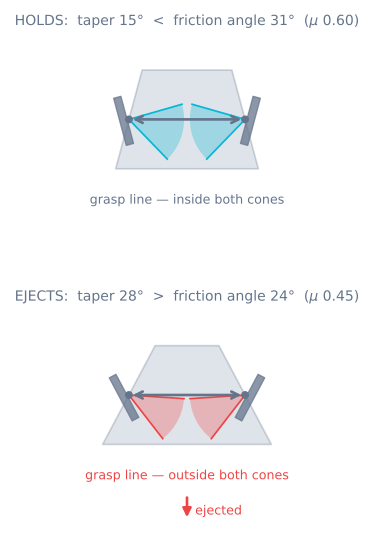
There is no N in it. That is the whole answer to “why doesn’t squeezing help”. Squeezing raises the normal force, which raises the friction force by exactly the same proportion that it raises the wedge force trying to eject the object. The ratio is fixed, and the ratio is what decides.
You can watch that happen in the gripper simulator: load the taper preset, then drag the closure slider from 0.4 mm to the top of its range. The grip force goes from 0.40 N to 4.11 N — ten times harder — and the verdict does not move. Then leave the closure alone and drag μ from 0.45 to 0.55. At 0.53 the cone is ±27.9° and the object still ejects; at 0.55 it is ±28.8°, passes the 28° taper, and the grasp holds. Two hundredths of μ, and squeezing was never part of the argument.
Why your grasp is more tapered than you think
Reading tan(θ) < μ you might conclude this only matters for obviously conical parts. It matters far more often than that, because θ is the local tilt of the surface at the contact patch, not the overall shape of the object.
- Anything round. Grip a ball or a bottle off its equator and the local face is tilted. The further off-centre you grab, the steeper the taper, and there is a band near the top of every curved object where no amount of grip holds it.
- Draft angles. Injection-moulded parts have 1–3° of draft by design so they can leave the mould. A moulded cup is a cone.
- Anything printed with a chamfer. A 45° chamfer needs μ > 1 to hold on that face, which nothing you own has.
- Compliance moving the contact. As a soft pad deforms, the effective contact point migrates around the object — often uphill, onto a steeper part of the surface. A grasp can start inside the cone and walk itself out of it.
The practical version of this rule: look at where the pad actually touches and ask what the tangent plane is doing there. If it is not roughly parallel to the jaw, you are relying on friction you may not have.
Form closure: the fix that always works
Force closure needs friction. Form closure does not — it is the case where the geometry alone prevents any motion, so the grasp holds even at μ = 0. A shaft dropped into a V-block, a part captured in a matching pocket, a pin through a hole: nothing can move regardless of how slippery it is.
You almost never get true form closure with two fingers. What you get instead is partial form closure, and it is the single highest-value change you can make to a failing gripper:
| Change | What it does to the problem |
|---|---|
| V-groove in the finger | Turns one contact into two, at angles you choose. The object sits in the notch and the taper argument no longer applies to the ejection direction |
| A shaped pocket matching the part | Full form closure for that part. Unbeatable when you only ever pick one thing |
| A lip or hook under the object | Gravity is now carried by geometry, not friction. Grip only has to stop it toppling |
| Suction instead of pinching | No tangential requirement at all on a smooth face. Different failure modes entirely |
| Squashy pads that wrap | Increases the contact patch until it spans faces at several angles, which is form closure by accident — this is what soft grippers are for |
Notice what is not on that list: a bigger servo. The gripper simulator makes the point sharply — the taper verdict is unchanged across the whole force range, and a bigger servo only moves you towards crushing the part.
Raising μ is the other lever
If you cannot change the geometry, change the materials. This is cheap and works, within limits:
- TPU or silicone pads roughly double μ over bare PLA. Printed TPU at 0.3 mm layer height with a slightly under-extruded top layer is grippier still, because the ridges bite.
- Clean the pads. Dust and finger oil are the two biggest unlogged causes of “it used to work”. A gripper that degrades over a week is usually a dirty pad, not a tired servo.
- Do not sand pads smooth. Smooth maximises contact area, which does nothing for Coulomb friction, and minimises the mechanical interlock, which does everything.
- Know when μ collapses. Wet, oily, dusty, or frosty and you can lose half of it without warning. If the application has any of those, design for form closure and treat friction as a bonus.
There is a ceiling here. μ above about 1.0 is rare for dry engineering materials, so the friction angle tops out near 45°. A face steeper than that will never be held by pinching, full stop.
Two contacts is a bet, three is an argument
Everything above was for two point contacts, because that is what a parallel gripper is. It is worth being explicit about what you give up by choosing two.
With two contacts, the object is free to rotate about the axis joining them. Nothing in the grasp resists that except the friction moment of the contact patches — which for a genuinely small patch is nearly zero. So a two-finger grasp on a long object lets it pivot and swing, and then the swing changes the effective taper at the contacts, and then it leaves. This is the “it rotated out of the jaws on the way up” failure, and it is distinct from both slipping and ejecting.
Three or more contacts, spread around the object, remove that freedom. That is most of why industrial grippers for awkward parts have three jaws, and why a soft gripper that wraps beats a rigid one that pinches on anything irregular.
For a two-finger build, the practical mitigations are:
- Grasp through the centre of mass. A grasp line that passes through the centre of mass has no gravity torque to resist. Off-centre and you are relying on patch friction.
- Make the pads big and soft so the contact really is a patch with a real friction moment, not a point.
- Accelerate gently. The pivot is driven by the inertia torque of the move — this is the same acceleration term that dominates grip force sizing.
- Orient the part first if you can, so the long axis runs between the jaws rather than across them.
The checklist
Before printing a finger, answer these four:
- What is the tangent plane doing where the pad will touch? If it is tilted more than
atan(μ), no grip force will hold it. Change the geometry or the contact point. - What μ do I actually have, wet and dusty? Take the pessimistic number.
- Does the grasp line pass near the centre of mass? If not, size for the torque, not just the weight.
- Can I get partial form closure for free? A V-groove costs nothing at print time and removes the whole class of failure.
Then size the force — which is a completely separate problem with completely separate walls, covered in robot gripper types and grip force, and in the gripper simulator where you can watch the slip floor and the crush ceiling move.
Next
- Robot gripper types and grip force — the force budget, once geometry is settled
- Servo gripper force, stall and compliance — why a stiff finger cannot aim at its own window
- The gripper simulator — drag μ past the taper and watch the cone open
- Pushing force and traction — the same μN argument, applied to wheels instead of fingers
Explore the graph
Part of these builds
Projects and learning paths that include this tutorial.
Further reading